

The Dispatcher console
Dispatch, GPS tracking and guard patrol software
Dispatcher is the console you manage your radios from: every unit on one map, talk groups you build yourself, push-to-talk from the desk, and guard patrol with NFC checkpoints and reports that email themselves.
Dispatch software
2 products. Prices exclude VAT.
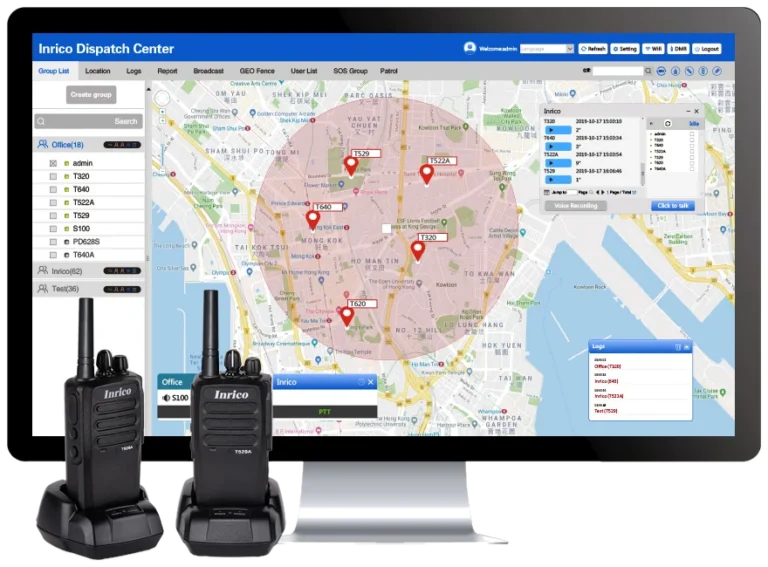
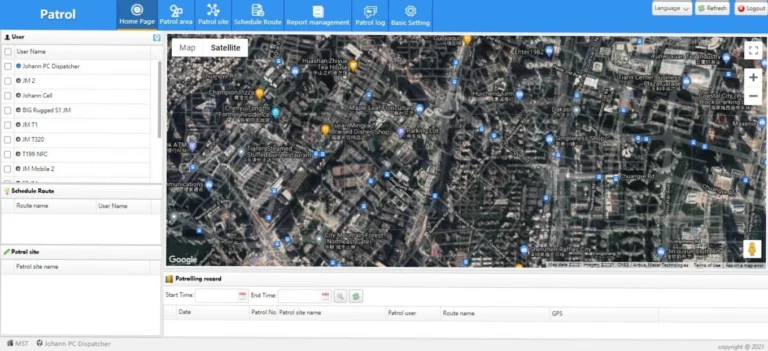
Every radio on one map
Your groups are listed down the left and the radios sit on the map. Grey means offline, and the border colour shows which group a radio is on. Satellite view shows which building a unit is actually behind.
Talk from the desk
The push-to-talk button sits in the bottom left corner of the console. Press it with the mouse, or use the space bar.
Geofences
Draw a circle, a square or your own shape around a site and get an alert when a user enters or leaves it, only on the days and hours you set.
Groups changed over the air
Create a talk group, add the users and the change reaches the radios over the air. Nobody brings a radio in to be reprogrammed.
Guard patrol, step by step
From mounting the first tag to the report landing in your client’s inbox.
-
1
Mount the tags
An NFC checkpoint tag goes wherever a guard has to physically be: a gate, a substation door, the far corner of a yard. They are small and stick to almost anything.
-
2
Scan them into Dispatcher
Walk the route once with the radio and tap each tag. They arrive in Dispatcher ready to be named and placed on the map, so the round on screen matches the round on the ground.
-
3
Build the patrol
Set the route, the time slots and how often it has to be walked: hourly through the night, twice a shift, whatever the contract says.
-
4
Radio sends a reminder
Two minutes before a patrol is due the handset speaks up. Again at one minute. And once more when the window opens. Nobody has to watch a clock.
-
5
Every scan gets confirmed out loud
Each tag tapped is acknowledged on the radio, so the guard knows it registered and is not walking the round twice to be sure.
-
6
Missed patrols show up while the shift is ongoing
A point not reached inside its window raises an alert on the Dispatcher console showing which guard and which tag. You find out during the shift, not the next morning.
-
7
The report becomes available and gets emailed automatically
At the end of the shift the patrol report goes out by email, to you or straight to your client. The same report can be pulled from Dispatcher whenever you want it.
What you need to use it
Dispatcher V3 needs a Windows PC that stays on, because the console keeps recording while it is open. We issue the sign-in credentials.
Each radio on the platform carries a monthly licence that covers the platform and its data. Guard patrol is a separate monthly licence per radio, only on the radios that need it. Your quotation sets out both.
See it before you buy
The Support centre has two walkthrough videos, one for Dispatcher and one for setting up a patrol from start to finish, and a written guide for every step.
Questions we get asked
What does the monthly cost cover?
The licence and data fee is charged per radio and covers the platform licence plus the data the radio uses. Guard patrol is a separate monthly licence per radio, only if you need it. Ask us for a quotation and we will set out the fees for your fleet.
Can our clients receive the patrol reports?
Yes. Reports go out as PDF by email, to your company or straight to your client, by day, week or month, and can be pulled from Dispatcher whenever you need one.
What happens when a guard misses a checkpoint?
A point not reached inside its window raises an alert on the Dispatcher console showing which guard and which tag, while the shift is still in progress.
What do I need to use Dispatcher?
A Windows PC that stays on, and the credentials we issue. The console keeps recording while it is open.
Also worth a look
Not sure which fits?
Tell us the sites, the shift pattern and how many people need to hear each other. We will come back with a build and a price.